High Availability on Razorpay Payments Dashboard
Originally published on Razorpay Engineering
Our journey of delivering a product with the least downtime.
The Payments Dashboard is the face of Razorpay business, which every merchant uses to check the order, payment, settlements, and do many other everyday activities. Hence, it is essential to provide a seamless, crash-free experience to our merchants on the Payments Dashboard.
The Problem Was Serious
- The crash-free session rate (percentage of sessions with no UI crashes) at times was as low as ~50%
- At times, there were around 7000 crashes per hour on average — the majority of these were false alerts which impacted MTTD of real issues
- The MTTA (Mean Time to Acknowledge) of the incidents was more than 2 hours
- There were no proper checks on the build and deployment pipelines
These crashes were hindering the day-to-day operations of our merchants. Solving this problem was critical for our business.
Solutioning Was Challenging
- There were more than 40 different engineers from 16 different teams working on this product
- We were working on a massive codebase with 12,000 files
- Finding the right team and owner for such a project was crucial for the success of the project
We Love Challenges
With our solution, we:
- Reduced number of crashes by 350x to 20 per hour (which was 7000 per hour initially)
- Increased crash-free sessions to ~99.9X% (which was ~50% initially)
- Avoided bad deployments with breaking changes more than 10 times out of ~100 deployments in the last 3 months
- Reduced the MTTA to ~2–3 minutes (which was ~2–3 hours initially)
- Added stronger checks at build time — found that 10–15% of PRs had breaking changes at the build level
How We Did It
1. Narrowed Down the Errors to the Right Owner
This was perhaps the most difficult piece since multiple teams were contributing to the codebase.
- Created a new custom dashboard providing a snapshot of all errors happening across different teams and the availability status of their features
- Marked team owners at the route-level to make sure errors occurring on those routes were assigned to the right owners
- Wrote the
ErrorBoundarywrapper for wrapping complex components, which can automatically tag the team and set the priority

- Created routing rules in the codebase as well as in error monitoring tools to tag the right team based on the stack, file path, and URL
2. Identified and Fixed the Issues
- Refactored and gathered data points from multiple stakeholders to have clear ownership of all parts of the Payments Dashboard
- Gave all teams a personalized dashboard to deep-dive and focus on high volume and critical errors easily
- After finding the right stakeholders, we gave all teams a fixed timeline — all teams worked in tandem and resolved all bugs and issues within 2 months
Before (crashes at ~7000 errors/hour on average):
After (crashes dropped to ~28 errors/hour):
3. Added Checks to Avoid New Issues
Solving the existing issues was just solving the current challenges. We wanted to avoid new issues popping into production.
Checks at pre-commit:
- Added commit hooks to lint the code with auto prettify, tsc, and eslint
Checks at post-commit:
- PR size checks
- Sensitive files reviewed only by certain folks
- ESLint checks
- TypeScript checks
- Bundle size difference for reviewers to see the impact of the PR
- Unit and integration tests
- Code coverage threshold checks
- Code owners — ensured PR reviews are allowed only from the set of code owners
Checks at deployment:
- Added end-to-end test suite on the automation environment
- Added end-to-end test suite on production environment with 0% traffic
- Halted deployment if the end-to-end suite fails
Stronger checks on the build pipeline, PR, and deployment:
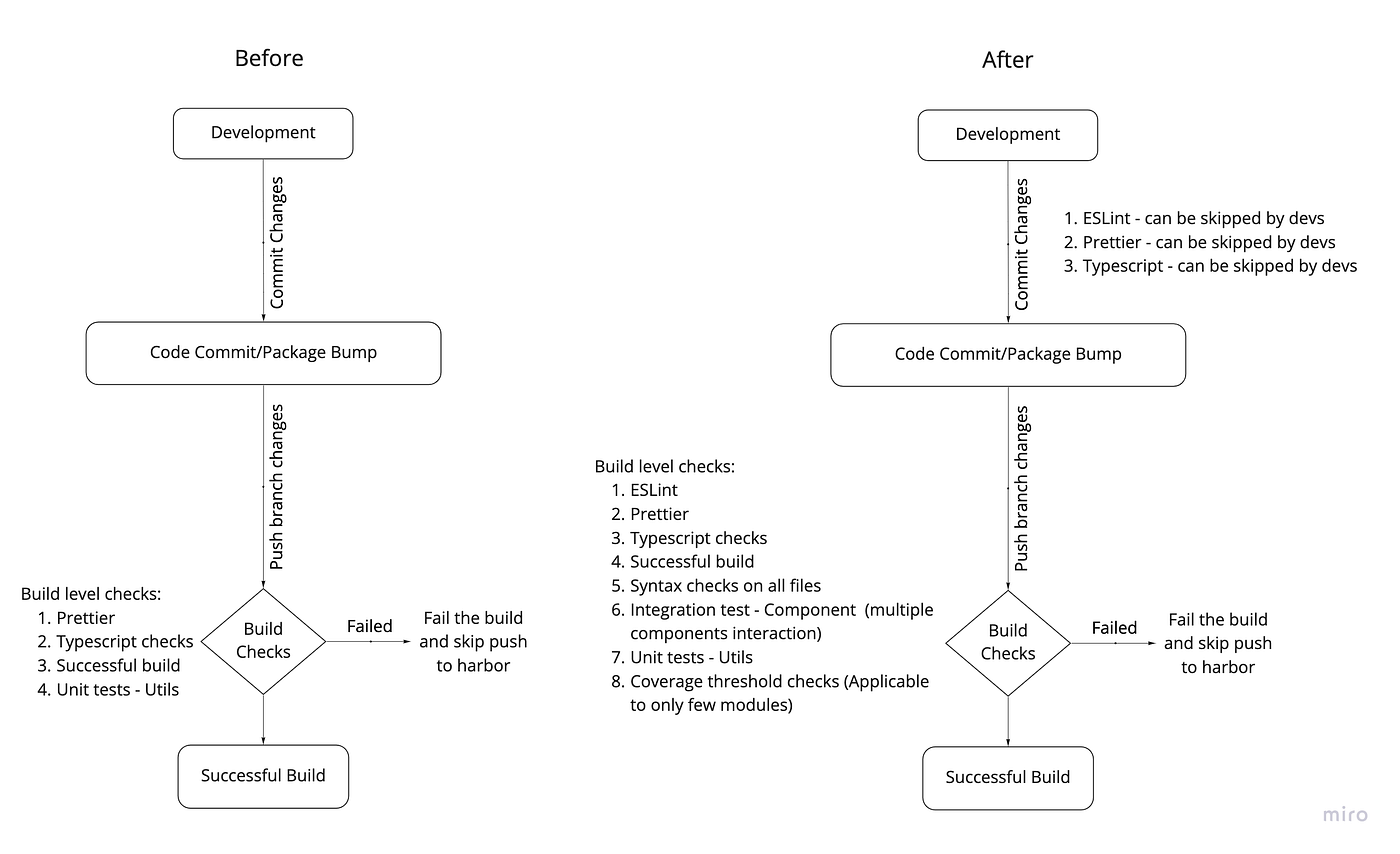
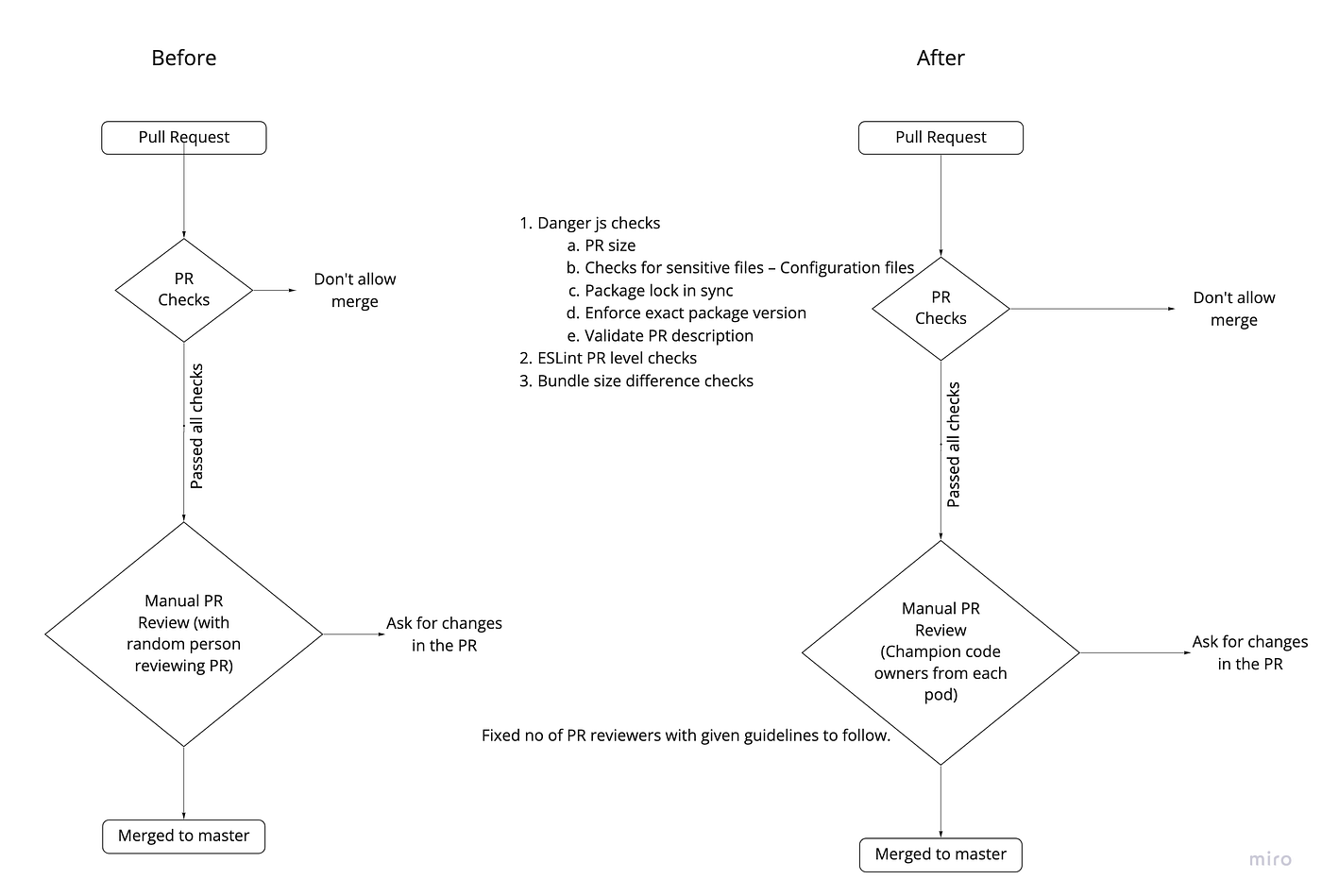
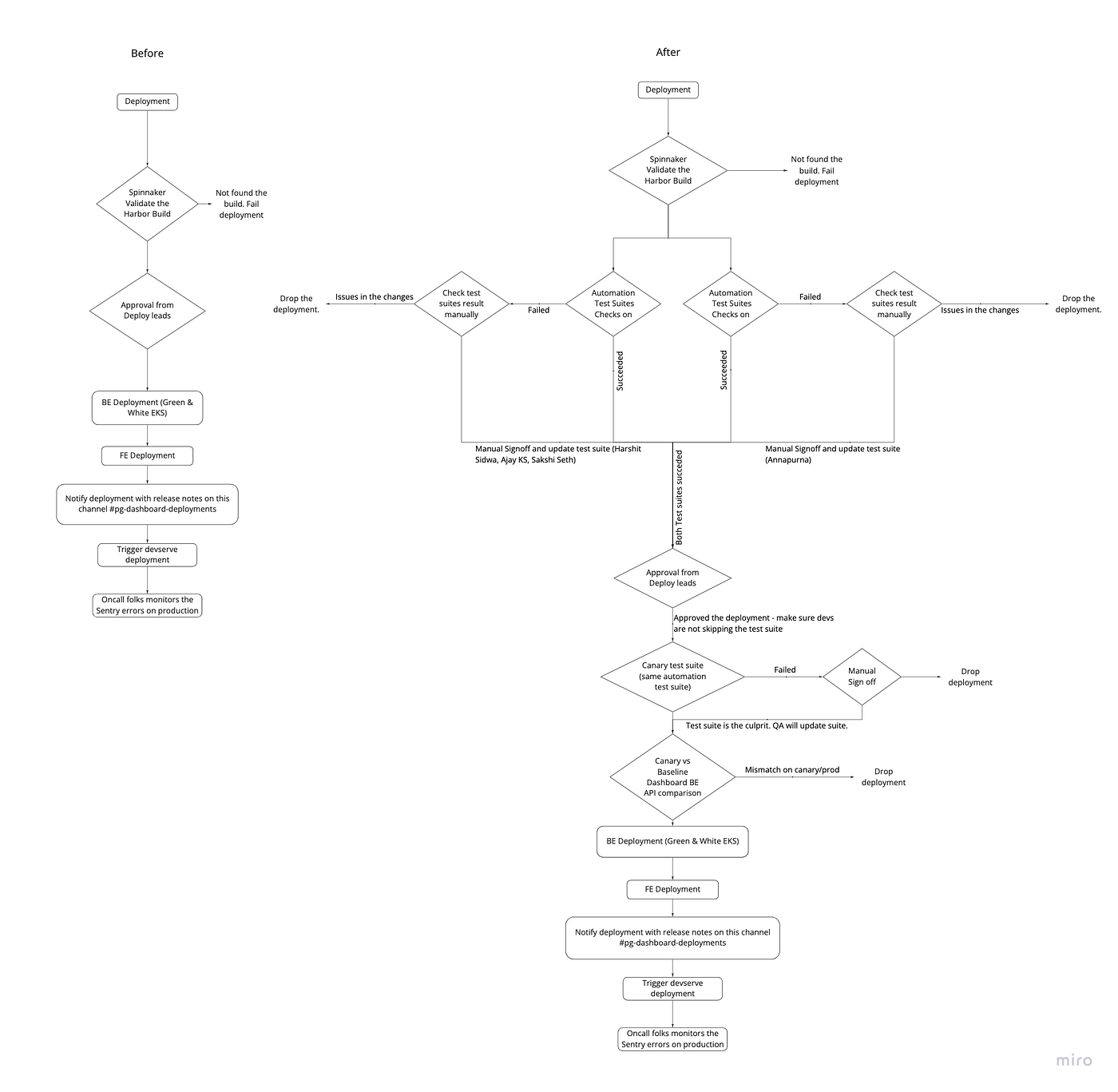
These checks resulted in avoiding more than 10 bad deployments which had breaking changes in the last 3 months.
4. Reduced the Incidents & MTTA
We realized that no system can be built foolproof despite adding all possible checks while building and deploying. So, we integrated our error monitoring tool with PagerDuty to report critical incidents immediately to our engineers through a phone call.
Every week, we conducted action review logs with the stakeholders to reduce the number of incidents and the MTTA.
5. Faster Rollbacks in Case of Incidents
We created a new, simple revert pipeline — a one-click start and one-click approval process. The entire revert process takes 2–3 minutes to restore to an older stable version of the Dashboard (which used to take ~30 minutes initially).
What Lies Ahead
- Check each PR to ensure that there are end-to-end test cases for new flows
- Run end-to-end test suites with different user roles (Owner, Manager, Finance, Operations, etc.)
- Add more integration tests and increase the code coverage